
本页目录
该功能的 WordPress 函数为:
add_theme_support()
Xitou 主题由以下程序构建:
文件位于:
/inc/custom-header.php
代码为(Xitou 为我的主题名):
<?php/** * Sample implementation of the Custom Header feature * 自定义标头功能的示例实现 * * * * You can add an optional custom header image to header.php like so ... * 您可以添加一个可选的自定义标题图像到标题. php 喜欢这样..。 * <?php the_header_image_tag(); ?> * * @link https://developer.wordpress.org/themes/functionality/custom-headers/ * * @package xitou */
/** * Set up the WordPress core custom header feature. * 设置 WordPress 核心自定义标头功能。 * * @uses xitou_header_style() */function xitou_custom_header_setup() { add_theme_support( 'custom-header', apply_filters( 'xitou_custom_header_args', array( 'default-image' => '', 'default-text-color' => '000000', 'width' => 1000, 'height' => 250, 'flex-height' => true, 'wp-head-callback' => 'xitou_header_style', ) ) );}add_action( 'after_setup_theme', 'xitou_custom_header_setup' );
if ( ! function_exists( 'xitou_header_style' ) ) : /** * Styles the header image and text displayed on the blog. * 设置标题图像和博客上显示的文本的样式。 * * @see xitou_custom_header_setup(). */ function xitou_header_style() { $header_text_color = get_header_textcolor();
/* * If no custom options for text are set, let's bail. * 如果没有设置文本的自定义选项, 让我们保释。 * get_header_textcolor() options: Any hex value, 'blank' to hide text. Default: add_theme_support( 'custom-header' ). */ if ( get_theme_support( 'custom-header', 'default-text-color' ) === $header_text_color ) { return; }
// If we get this far, we have custom styles. Let's do this. //如果我们走了这么远, 我们就有了自定义样式。让我们这样做。 ?> <style type="text/css"> <?php // Has the text been hidden? if ( ! display_header_text() ) : ?> .site-title, .site-description { position: absolute; clip: rect(1px, 1px, 1px, 1px); } <?php // If the user has set a custom color for the text use that. else : ?> .site-title a, .site-description { color: #<?php echo esc_attr( $header_text_color ); ?>; } <?php endif; ?> </style> <?php }endif;调用该图片的方法为:
<img src="<?php header_image(); ?>" height="<?php echo get_custom_header()->height; ?>" width="<?php echo get_custom_header()->width; ?>" alt="" />具体内容见 add_theme_support() 函数介绍。具体功能如下图:
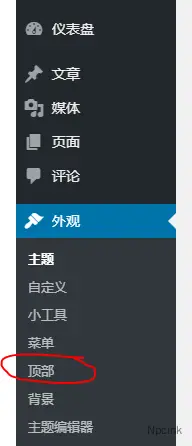
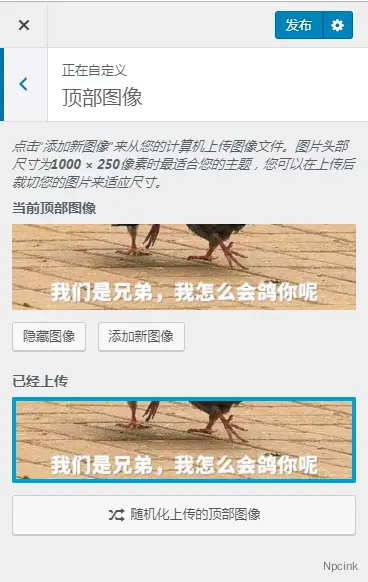
以下内容可参考:
在 WordPress 2017 主题中,该功能的调用代码在 header.php 的 32 行:<?php get_template_part( 'template-parts/header/header', 'image' ); ?>此代码调用 /template-parts/header/header-image.php 中的代码(15 行):
<?php the_custom_header_markup(); ?>the_custom_header_markup() 的作用是:打印自定义标题的标记。
官方文档:https://developer.WordPress.org/reference/functions/the_custom_header_markup/
就是这一段代码输出类似这样的 html 代码:
<div id=“wp-custom-header” class=“wp-custom-header”><img src=“https://baimu.org/wp-content/themes/twentyseventeen/assets/images/header.jpg” width=“2000” height=“1200” alt=“百牧” /></div> </div>
而类似上面提到的功能代码在 /inc/custom-header.php 文件中的第 36 行,部分代码如下:
add_theme_support( 'custom-header', apply_filters( 'twentyseventeen_custom_header_args', array( 'default-image' => get_parent_theme_file_uri( '/assets/images/header.jpg' ), 'width' => 2000, 'height' => 1200, 'flex-height' => true, 'video' => true, 'wp-head-callback' => 'twentyseventeen_header_style', ) ) );我还是没弄懂。