
本页目录
虽然国内上这些社交平台有一些困难,但作为主要的国外平台,还是需要了解一下的。一起来看看,web 怎么将动态内容分享到 Facebook,Twitter 等社交平台吧。
对固定内容的分享,我们可以查看文档(Fb 分享文档, TW card)后就大概知道怎么去做。但如果我们想对动态内容进行分享,比如我们想把用户的昵称加到分享里,应该怎么做呢?
我们可以先了解一下”分享”的大致过程。
- 原文来源:详情
社交平台如何对页面抓取分享信息
社交平台是会抓取目标页面的代码(注意是服务器返回的html代码,由js操作后的 html 它们是抓不到的),
然后对 html 中的<title/>和<meta/>标签进行分析。一般来说<title/>会作为要分享的标题,<meta name="description" content="">会作为分享的正文。这是最基本的两个抓取点。
另外的可选的抓取点则是其他 meta 标签,比如插入图片的 meta 标签是:
<meta property="og:image" content="图片地址" /> <!-- facebook --><meta name="twitter:image" content="图片地址" /> <!-- twitter -->所有相关的 meta 写法请参考平台开发文档,或者查看这篇文章来大致了解(英文的,我都能大概看懂,请放心看):
What You Need to Know About Open Graph Meta …
就是说如果你的 html 像这样:
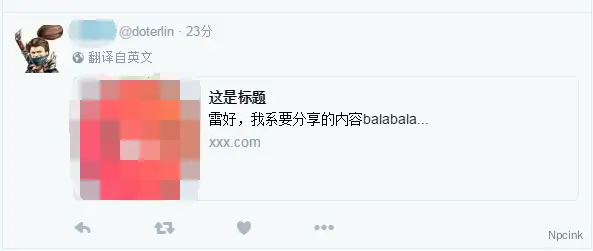
...<meta property="og:image" content="xxx" /> <!-- facebook --><meta name="twitter:image" content="xxx" /><!-- twitter--><meta name="description" content="雷好,我系要分享的内容balabala..."><title>这是标题</title>最后社交平台会解析出来你的要分享的信息,并加上平台自己的样式(此处以 twitter 效果为例):
js 分享操作
有了填写好<title>和<meta>的页面。接下来是对页面地址进行分享的操作。
首先先引入 fb 的 sdk:
<div id="fb-root"></div><script>(function(d, s, id) { var js, fjs = d.getElementsByTagName(s)[0]; if (d.getElementById(id)) return; js = d.createElement(s); js.id = id; //下面填入一个你的app id,如果还没,请在fb开发者平台注册一个 js.src = "//connect.facebook.net/en_US/sdk.js#xfbml=1&version=v2.8&appId={your app id}"; fjs.parentNode.insertBefore(js, fjs);}(document, 'script', 'facebook-jssdk'));</script>触发事件进行分享示例:
var shareToFbBtn = document.getElementById('fb-btn');shareToFbBtn.onclick = function(){ FB.ui({ method: 'share', href: "htttp://www.eaxmple.com/share.html" //这里换成你的网址 }, function(response){ //分享回调 })}简单的 tw 分享并不需要调用 sdk,只需要跳转到一个特定页面:
var shareToTwBtn = document.getElementById('tw-btn');var twTitle = '输入标题';var twUrl = '要分享的页面地址';shareToTwBtn.onclick = function(){ window.open('http://twitter.com/home/?status='.concat(encodeURIComponent(twTitle)).concat(' ').concat(encodeURIComponent(twUrl))}服务端生成 html
当我们知道如何对页面进行分享操作以后,就要考虑怎样对这个页面进行动态内容的生成将要被抓取的html代码。这就需要服务端脚本写一个页面(一下为php实现),代码解说加在注释中方便查看:
<?php//如果传入image参数就生成相关的meta,以下几条类似if(isset($_GET["image"])){ $image=$_GET["image"]; $meta_image_fb = '<meta property="og:image" content="'.$image.'" />'; $meta_image_tw = '<meta name="twitter:image" content="'.$image.'" />';}if(isset($_GET["description"])){ $description=$_GET["description"];}if(isset($_GET["title"])){ $title=$_GET["title"]; $meta_title = '<meta property="og:title" content="'.$title.'" />'; $meta_title = '<meta name="twitter:title" content="'.$title.'" />';}if(isset($_GET["type"])){ $type=$_GET["type"]; $meta_type_fb = '<meta property="og:type" content="'.$type.'" />';}if(isset($_GET["url"])){ $url=$_GET["url"]; $meta_url_fb = '<meta property="og:url" content="'.$url.'" />'; $meta_url_tw = '<meta name="twitter:url" content="'.$url.'" />';}//如果传入video参数就生成video相关的metaif(isset($_GET["video"])){ $video=$_GET["video"]; $meta_video_fb = '<meta property="og:video" content="'.$video.'" /><meta property="og:video:type" content="video/mp4" /><meta property="og:video:width" content="487" />'; $meta_video_tw = '<meta name="twitter:player" content="'.$video.'" />';}if(isset($_GET["card"])){ $card=$_GET["card"]; $meta_card_tw = '<meta name="twitter:card" content="'.$card.'" />';}?><!DOCTYPE html><html><head> <!-- 这段是移动端需要的meta设置,如果是pc请按需要做相关修改 --> <meta charset="utf-8"> <meta content="width=device-width,initial-scale=1.0,maximum-scale=1.0,user-scalable=no" name="viewport"> <meta content="yes" name="apple-mobile-web-app-capable"> <meta content="black" name="apple-mobile-web-app-status-bar-style"> <meta content="telephone=no" name="format-detection"> <meta content="email=yes" name="">
<?php echo isset($image)?$meta_image_fb:'' ?> <?php echo isset($url)?$meta_url_fb:'' ?> <?php echo isset($video)?$meta_video_fb:'' ?> <?php echo isset($title)?$meta_title_fb:'' ?> <?php echo isset($type)?$meta_type_fb:'' ?> <meta property="og:description" content="<?php echo isset($description)?$description:'' ?>" />
<?php echo isset($image)?$meta_image_tw:'' ?> <?php echo isset($url)?$meta_url_tw:'' ?> <?php echo isset($video)?$meta_video_tw:'' ?> <?php echo isset($title)?$meta_title_tw:'' ?> <?php echo isset($card)?$meta_card_tw:'<meta name="twitter:card" content="summary" />' ?> <meta name="twitter:site:id" content=""> <meta name="twitter:title" content="<?php echo isset($title)?$title:'' ?>"> <meta name="twitter:site" content=""> <meta name="twitter:description" content="<?php echo isset($description)?$description:'' ?>" /> <meta name="description" content="<?php echo isset($description)?$description:'' ?>"> <title><?php echo isset($title)?$title:'' ?></title> <script type="text/javascript"> //如果希望用户点击了你的分享内容后跳转到特定页面 window.location.href="http://www.eaxmple.com/xxx.html"; </script></head><body></body></html>这样,我们就可以利用上一节介绍的方法在你进行分享操作的页面(比如说这个页面包含了 fb 分享按钮)写好 js(假设你把刚才的share.php文件部署在http://www.example.com/share.php):
var shareTitle = encodeURIComponent('我的昵称是:'+userName); //假设你要在标题中分享用户名,需要先定义好userNamevar shareContent = encodeURIComponent('这里是要分享的内容balabala....'); //如果内容也不固定请传入内容var shareUrl = 'http://www.example.com/share.php?'+'title='+shareTitle+'&description='+shareContent; //如果有其他需要请拼接,比如+"&image="+ encodeURIComponent(shareImageUrl);//facebookvar shareToFbBtn = document.getElementById('fb-btn');shareToFbBtn.onclick = function(){ FB.ui({ method: 'share', href: shareUrl }, function(response){ //分享回调,可留空 })}//twittervar shareToTwBtn = document.getElementById('tw-btn');shareToTwBtn.onclick = function(){ window.open('http://twitter.com/home/?status='.concat(shareTitle).concat(' ').concat(encodeURIComponent(shareUrl))}到此就 ok!
最后几句
- 当然你要查看到这些效果(或者引入 FB sdk)是需要能访问
facebook和twitter,不过不能就那啥一下… - 教程类文章只是更通俗和直接些,如果仍有疑问和需要更深入,还是推荐多翻翻官网文档,
facebook的开发文档是做了些汉化的, Twitter 的文档就坚持国(wo)际(ca)化(lie)。 - 贴出两个东西,分别是 fb 和 tw 的抓取
调试工具:
https://developers.facebook.com/tools/debug/sharing/
https://about.twitter.com/zh-hans/resources/buttons#tweet
以上内容仅作补充,下面的内容可供各位参考: